Discovery
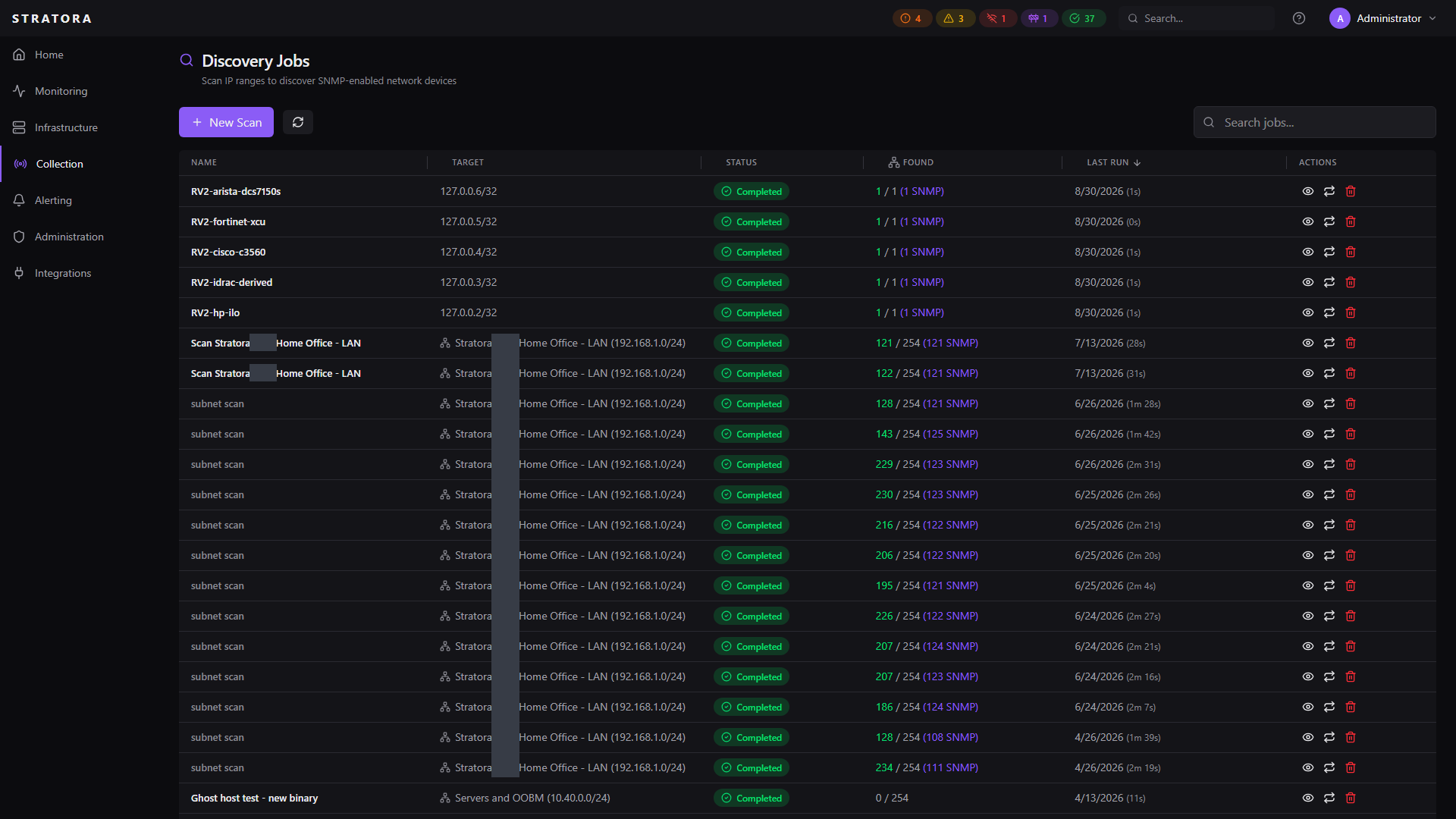
Network discovery scans your subnets to find devices, identify what they are, and match them to the right monitoring template — so you can bring infrastructure into Stratora without manual configuration.
Discovery uses a multi-signal fingerprinting engine that combines SNMP, port scans, HTTP banners, DNS, and MAC address analysis to classify devices with high confidence.
How Discovery Works
A discovery scan runs through up to five phases in sequence. Each phase is optional and can be toggled when creating the job.
| Phase | Signal | What It Does |
|---|---|---|
| 1. ICMP Ping | Reachability | Sweeps the target range to find live hosts |
| 2. TCP Port Scan | Port profile | Probes a 14-port fingerprint covering web (80, 443, 8080, 8443), SMB/RPC (135, 139, 445), RDP/WinRM (3389, 5985, 5986), shell/telnet (22, 23), DNS (53), and printer (9100) |
| 3. SNMP | sysObjectID, sysDescr | Queries SNMP system MIB for device identity — the highest-confidence signal |
| 4. HTTP Banner | Server header, HTML title, TLS certificate | Probes web interfaces to identify device type from headers and certificate fields |
| 5. DNS | PTR record | Performs reverse DNS lookup with forward verification for hostname classification |
Phases run concurrently with up to 30–50 probes in flight per phase. Per-host timeouts keep scans fast: 1.5 seconds for TCP, 3 seconds for SNMP, 5 seconds for HTTP.
Creating a Discovery Job
Navigate to Collection → Discovery Jobs and click New Scan.
Target Selection
Discovery jobs can target:
| Target Type | Description |
|---|---|
| Subnet | Scan a single IPAM subnet (e.g., 10.1.20.0/24) |
| Supernet | Scan all subnets under an IPAM supernet |
| Site | Scan all subnets assigned to a site |
Define your subnets in IPAM first, then run discovery against them. This keeps your address space documented and lets discovery populate IPAM records automatically.
SNMP Credentials
If you want SNMP fingerprinting (the most accurate signal), select the SNMP credentials to use during the scan. The scan will try the provided credentials against each host.
Phase Selection
Toggle individual phases on or off. All phases are enabled by default. Disabling SNMP still allows classification via port profiles, HTTP banners, and DNS — just with lower confidence.
Multi-Signal Fingerprinting
After all phases complete, the fingerprinting engine combines signals to classify each device.
Signal Confidence Levels
| Signal | Confidence | How It Works |
|---|---|---|
| SNMP sysObjectID | High (90) | Matches the device's enterprise OID against a built-in database of vendor prefixes |
| SNMP sysDescr | High (90) | Pattern-matches the system description against 40+ known device signatures |
| HTTP Banner | Medium–High (60–90) | Identifies devices by web interface headers, page titles, and TLS certificate fields |
| MAC OUI | Medium (60) | Looks up the hardware manufacturer from the IEEE vendor prefix |
| Port Profile | Medium (60) | Infers device type from open port combinations (e.g., 135+445 = Windows) |
| Hostname | Low (30) | Pattern-matches the FQDN as a tiebreaker |
Classification Logic
- Short-circuit — if SNMP sysObjectID, sysDescr, or HTTP banner returns a high-confidence match, classification is immediate
- Aggregation — when no single signal is conclusive, all signals vote. If two or more signals agree on a device type, confidence gets a +15 boost
- Conflict resolution — if two signals disagree at medium+ confidence, the final confidence is capped to prevent false positives
- Anti-false-positive guards — certain classifications require corroborating evidence (e.g., Windows requires port 135/445, not just a hostname pattern)
Recognized Device Types
Discovery can classify a wide range of infrastructure:
- Network devices — Cisco (Catalyst, SG/CBS series), Aruba, Juniper, MikroTik, Ubiquiti, TP-Link, Netgear
- Firewalls — Palo Alto, FortiGate, pfSense, OPNsense, SonicWall, Sophos, WatchGuard, Meraki
- Storage — QNAP, Synology, TrueNAS, FreeNAS, Unraid, NetApp
- Wireless — Aruba, Ubiquiti UniFi
- Servers — Windows Server, Linux (various distributions)
- Hypervisors — VMware ESXi, vCenter, Proxmox VE
- BMC / Out-of-Band — Dell iDRAC, HPE iLO, Supermicro IPMI, Lenovo XClarity
- UPS / Power — APC, CyberPower, Eaton, Tripp Lite
- Printers — HP, Epson, Brother, Canon, Xerox
- Other — IoT controllers, web servers, and more
Discovery classifies VMware ESXi, vCenter, and Proxmox VE as their own hypervisor node types and routes them through the credentialed import (below) — the guided add-path described in Virtualization. Hyper-V hosts are classified as Windows Servers; the Hyper-V role is surfaced by the Stratora Windows Agent, not by network fingerprinting. (Hyper-V VMs are recognized by their Microsoft virtual MAC as Virtual Machines.)
Discovery Results
After a scan completes, each discovered device shows:
- IP address and hostname (from DNS or SNMP sysName)
- SNMP system info — sysObjectID, sysDescr, sysName, sysLocation, sysContact
- Hardware identity — manufacturer, model, serial number (from ENTITY-MIB if available)
- Classification — device type, vendor, OS family, confidence level, and detection method
- Suggested template — the device template Stratora recommends based on classification
- Monitoring suggestion — e.g., "Deploy Windows Agent", "Enable SNMP monitoring"
- Status — whether the device is already monitored, newly discovered, or ignored
Reviewing and Importing
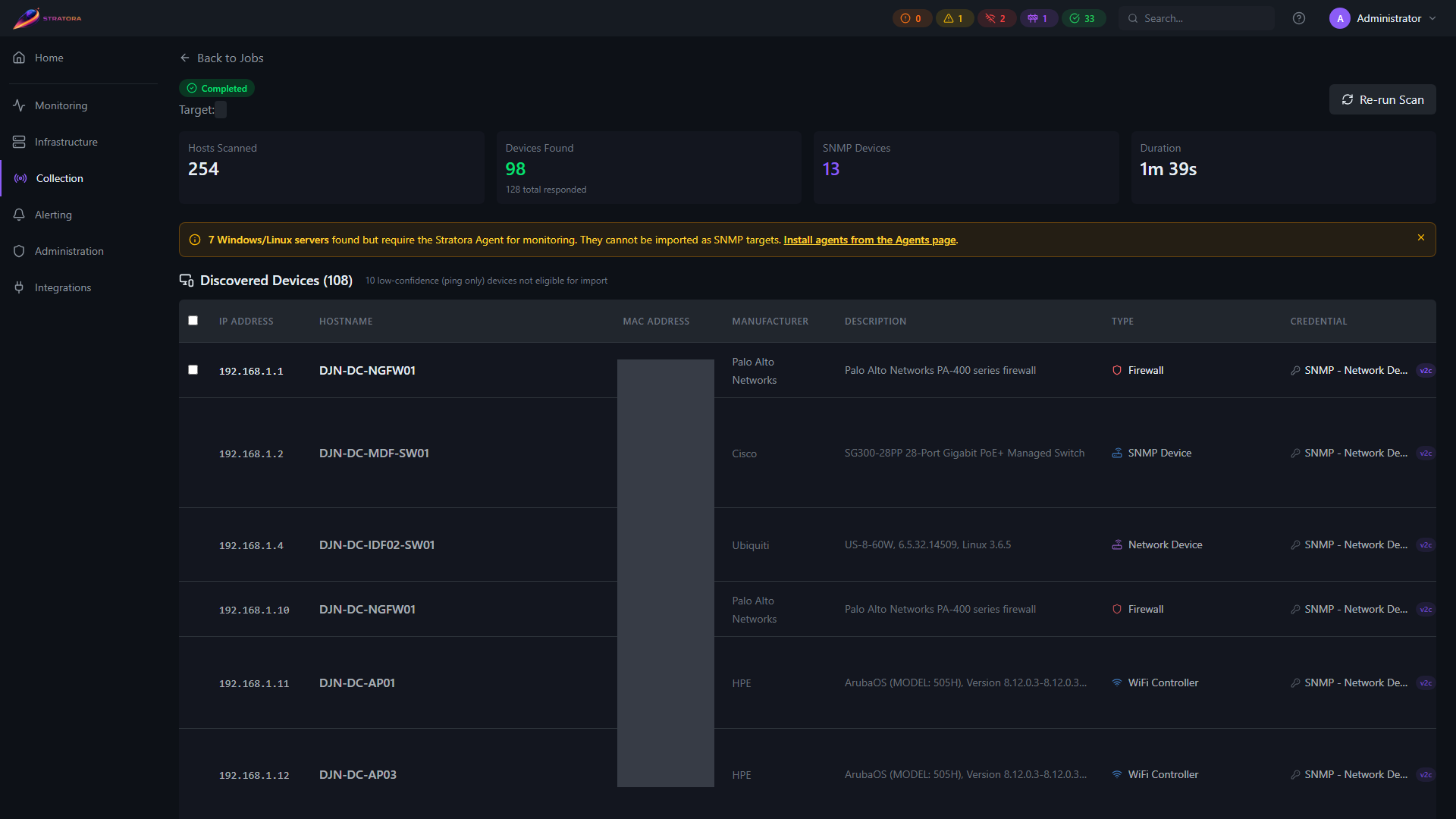
From the results view:
- Review the discovered devices and their classifications
- Select the devices you want to monitor
- Click Import to create nodes from the selected devices
During import, Stratora automatically:
- Creates a node with the correct type and template
- Populates system fields from SNMP data
- Assigns the node to the site associated with the target subnet
- Links the node to the site's preferred collector
When the selected device is a classified hypervisor (vCenter, ESXi, or Proxmox VE), the import binds the matching credential — a VMware API or Proxmox VE API Token (validated against the host on the spot), or an SNMP credential for an ESXi VMware Host — and starts the platform probe. You can pick an existing stored credential or create one inline. See Virtualization for the complete per-platform setup.
Devices you don't want to monitor can be marked as Ignored so they don't clutter future scan results.
Relationship to IPAM
Discovery and IPAM work together:
- Discovery populates IPAM — when a scan finds live hosts, their IP addresses are automatically added to the IPAM address table with hostname, MAC address, and last-seen timestamps
- IPAM feeds discovery targets — you can scope discovery scans to IPAM subnets, supernets, or entire sites
- Stale address detection — running periodic scans keeps IPAM records current and surfaces addresses that are no longer responding
Re-Running Scans
You can re-run a previous discovery job to check for new devices or changes. Re-scans respect existing device statuses — devices already imported won't be duplicated, and ignored devices stay ignored.
Schedule periodic discovery scans against your key subnets to catch new devices as they come online. This is especially useful in environments where IT equipment is added without change management.