Enrollment
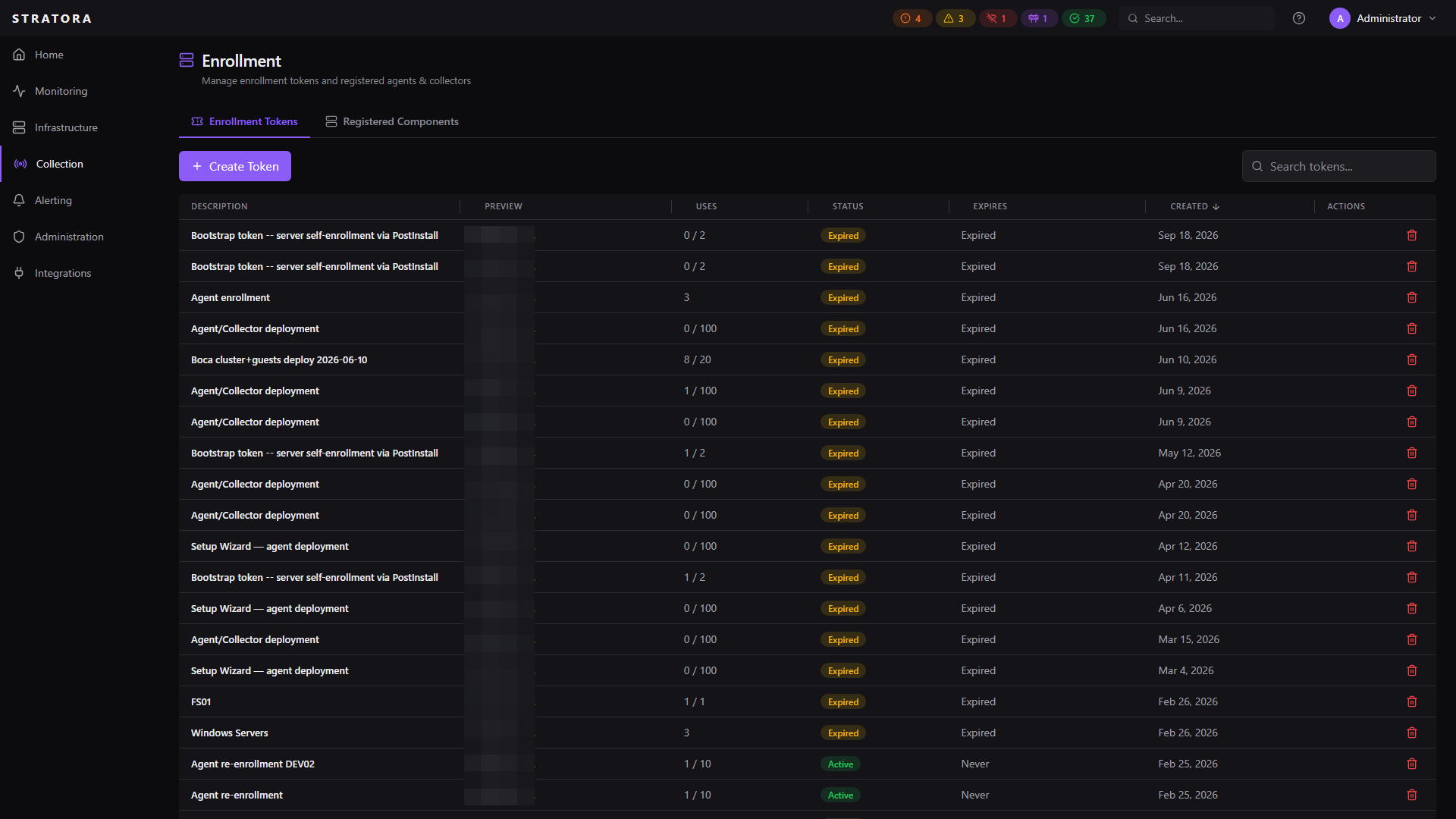
Enrollment is how collectors and agents register with the Stratora server. It uses a token-based flow — you create a temporary enrollment token in the UI, then pass it to the installer. The component uses the token to register and receives a unique, permanent API key for ongoing authentication.
This design keeps deployment simple (one shareable token for a batch of installs) while maintaining security (each component gets its own isolated API key).
How Enrollment Works
After enrollment:
- The enrollment token can be discarded (or reused for more installs if it's multi-use)
- The API key (
sk_stra_xxxxx) is the component's permanent credential for all communication with the server - The server stores only a bcrypt hash of the API key — the plain-text key exists only on the component itself
Enrollment Tokens
Creating a Token
Navigate to Collection → Enrollment API and click Create Token.
| Field | Required | Description |
|---|---|---|
| Description | No | Label for the token's purpose (e.g., "Q1 branch office rollout") |
| Multi-use | No | Whether the token can be used by more than one component (default: single-use) |
| Max uses | No | For multi-use tokens, an optional cap on total registrations |
| Expiration | No | How long the token is valid (default: 24 hours; set to 0 for no expiry) |
Single-Use vs. Multi-Use
| Single-Use | Multi-Use | |
|---|---|---|
| Registrations | Exactly one | Unlimited (or up to max uses) |
| Use case | One-off installs, high-security environments | Batch deployments, automated rollouts |
| Consumed | After first registration | When max uses reached or token expires |
Token Lifecycle
A token becomes exhausted (can no longer be used) when:
- Single-use: it has been used once
- Multi-use with limit:
use_count >= max_uses - Any token: the current time is past
expires_at
For automated deployments, create a multi-use token with a reasonable expiration (e.g., 7 days) and use limit. This gives your deployment tools a window to install, while limiting exposure if the token is leaked.
Re-Enrollment
If a collector or agent needs to be reinstalled on the same host (e.g., after a rebuild), re-enrollment is automatic. When a component registers with a hostname that already exists in remote_components:
- The existing component record is updated in place (not duplicated)
- A new API key is generated and the old one is invalidated
- For agents, the matching node in
nodesis also updated (matched on the reported hostname) - The component resumes normal operation with the new key
This means you can reimage a server and reinstall the agent with the same enrollment token — it just works.
Re-enrollment only matches on hostname. If the host has been renamed between the original enrollment and the re-enrollment (for example, an OS reinstall that also changed the hostname), Stratora cannot correlate the new name with the old record and a duplicate node will be created. See Server Renames and Agent Re-enrollment for the cleanup procedure.
Per-Component API Keys
Every enrolled component receives its own unique API key (sk_stra_xxxxx). This isolation means:
- Revoking one component doesn't affect others — even if they were enrolled with the same token
- Key compromise is contained — if a single agent's key is exposed, only that agent needs to be re-enrolled
- Audit trail is per-component — every API call is traceable to a specific agent or collector
Key Format
sk_stra_aB-cD_eFghIjKlMnOpQrStUvWxYzABC-DeF_GhIjKlMnOpQr
- Prefix:
sk_stra_(identifies it as a Stratora API key) - Body: 43 characters of base64url-encoded random data (256 bits of entropy)
Revocation
To revoke a component's access:
- Navigate to Collection → Collectors or Collection → Agents
- Select the component
- Click Revoke
The component's status changes to revoked and all API calls using its key are immediately rejected. Other components are unaffected.
Bulk Deployment
Enrollment is designed for mass deployment via common IT automation tools:
| Tool | Approach |
|---|---|
| PDQ Deploy | Push the MSI with the install parameters listed below |
| SCCM / MECM | Deploy as an application with a silent install command line |
| Intune | Package as a Win32 app (.intunewin) with install parameters |
| Ansible | Use the win_package module with MSI path and parameters |
| GPO | Deploy via Group Policy Software Installation with a transform file |
The Agent and Collector MSIs use different property names — they are separate WiX installers and the silent install commands are not interchangeable.
Collector MSI:
msiexec /i StratoraCollector-X.Y.Z.msi /qn SERVER_URL="https://stratora.example.com" ENROLLMENT_TOKEN="enroll_xxxxx"
Collector properties: SERVER_URL, ENROLLMENT_TOKEN, COLLECTOR_NAME (optional).
Agent MSI:
msiexec /i StratoraAgent-X.Y.Z.msi /qn SERVERURL="https://stratora.example.com" ENROLLTOKEN="enroll_xxxxx"
Agent properties: SERVERURL, ENROLLTOKEN, SITE (optional). Note the lack of underscores — these match the historical Agent property names and differ from the Collector MSI.
Create a multi-use token with a use limit matching your expected deployment count and a short expiration window (e.g., 48 hours for a weekend rollout).
Security Model
| Layer | Mechanism |
|---|---|
| Token storage | SHA-256 hashed — the plain-text token is never stored in the database |
| Token reveal | Optionally encrypted with AES-256-GCM for admin recovery |
| API key storage | bcrypt hashed (cost factor 12) — resistant to brute-force even if the database is compromised |
| API key prefix | First 12 characters stored for identification (e.g., sk_stra_aB-c...) without exposing the full key |
| Token expiration | Time-limited by default (24 hours) to reduce window of exposure |
| Use limits | Single-use or capped multi-use to prevent unlimited enrollment |
| Per-component isolation | Each component gets a unique key; revoking one doesn't affect others |
Treat enrollment tokens like temporary passwords. Use short expiration windows, set use limits for multi-use tokens, and delete unused tokens after your deployment is complete.
Component Statuses
After enrollment, components move through these statuses:
| Status | Meaning |
|---|---|
| Active | Component is enrolled and communicating normally |
| Offline | Component has missed heartbeats (network issue or service stopped) |
| Revoked | Access has been manually revoked — all API calls rejected |