Collectors
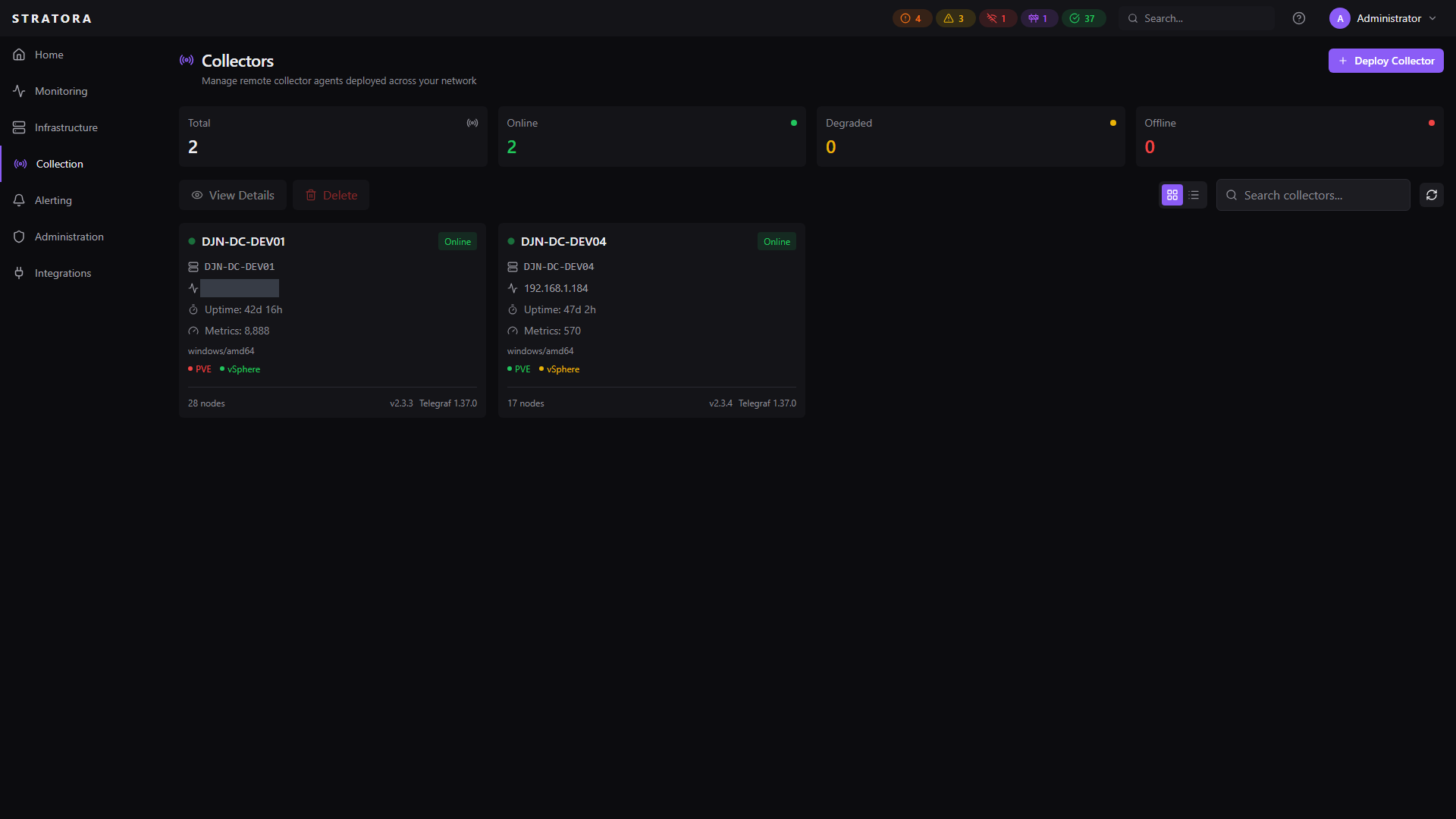
A collector is the component that polls your infrastructure and sends metrics back to the Stratora server. Collectors use an embedded Telegraf instance for metric collection — the Stratora server generates Telegraf configurations from your device templates and delivers them to each collector automatically.
Architecture
Local Collector
Every Stratora server includes a local collector that runs on the same machine as the backend. This handles monitoring for devices reachable from the server's network — typically the primary data center or management VLAN.
The local collector requires no extra installation. It's deployed as part of the standard Stratora server setup.
Remote Collectors
For devices in networks not reachable from the server — branch offices, factory floors, isolated OT segments — you deploy a remote collector. Each remote collector:
- Runs at the remote site as a Windows service
- Polls local devices via SNMP, ICMP, and other protocols
- Sends all collected metrics back to the Stratora server over HTTPS
- Pulls its configuration from the server every 10 seconds
You can deploy as many remote collectors as your environment needs. Each one operates independently — if the WAN link to the server goes down, collectors buffer metrics in memory during temporary connectivity interruptions. For brief outages, metrics are retained and delivered when connectivity resumes. During extended outages or restarts, in-memory buffers may be exhausted, resulting in partial metric gaps.
Deploying a Remote Collector
The fastest way to deploy a collector is from the Deploy Collector modal in the UI. Navigate to Collection → Collectors and click the Deploy Collector button. The modal provides two modes:
- Silent Install — generates a ready-to-run PowerShell command with your server URL, enrollment token, collector name, and site pre-filled. Copy and run on the target server.
- Interactive Install — download the MSI and run it manually. The modal shows your server URL for reference.
The MSI can also be downloaded directly at /api/v1/downloads/collector/windows.
MSI Installer
Remote collectors are installed via an MSI package. During installation you provide:
| Parameter | Required | Description |
|---|---|---|
SERVER_URL | Yes | Your Stratora server URL (e.g., https://stratora.example.com) |
ENROLLMENT_TOKEN | Yes | An enrollment token generated in the Stratora UI |
COLLECTOR_NAME | No | Optional display name for the collector |
Interactive Install
Run the MSI and enter the server URL and enrollment token when prompted.
Silent Install
For automated deployments (PDQ Deploy, SCCM, Intune, GPO):
msiexec /i StratoraCollector.msi /qn SERVER_URL="https://stratora.example.com" ENROLLMENT_TOKEN="enroll_xxxxx"
| Flag | Effect |
|---|---|
/qn | Fully silent (no UI) |
/qb | Basic UI (progress bar only) |
/l*v C:\temp\install.log | Verbose logging to file |
For mass deployments, create a multi-use enrollment token with an appropriate use limit and expiration window. See Enrollment for details.
What Gets Installed
The installer creates:
- StratoraCollector — Windows service that manages the collector lifecycle
- stratora-collector-telegraf — Windows service running the embedded Telegraf instance
- A system tray indicator showing collector status
- Configuration file storing the collector's identity and API key
On first startup, the collector registers with the server using the enrollment token and receives a unique API key. See Enrollment for how this works.
Configuration Delivery
Collectors don't need manual configuration. The Stratora server generates each collector's Telegraf config automatically based on the nodes assigned to it.
How It Works
- You assign nodes to a collector (directly or via a site's preferred collector)
- The server renders Telegraf configuration from each node's device template, injecting the node's IP, credentials, and collection interval
- The collector polls for config changes every 10 seconds
- When a change is detected, the collector applies it with a safe deployment pipeline
Safe Config Deployment
Config updates go through a validation-and-rollback pipeline:
- Write — new config written to a staging file
- Validate —
telegraf --testverifies the config parses correctly - Backup — current running config backed up
- Promote — staging config becomes active
- Restart — Telegraf service restarted with the new config
- Verify — collector confirms Telegraf is running after 10 seconds
- Rollback — if Telegraf crashes, the backup config is restored and a failure is reported
Config delivery uses hash-based change detection. If nothing changed since the last poll, the server returns a 304 Not Modified and the collector skips the update entirely.
Dirty Flag and Debounce
Changes that affect a collector's config (node edits, credential changes, template updates) set a dirty flag on the collector. A 5-second debounce window batches rapid changes — so editing five nodes in quick succession produces one config regeneration, not five.
Dirty flag triggers:
- Node created, updated, deleted, or reassigned
- Credential attached, detached, or modified
- Device template reloaded
- Server restart (all online collectors marked dirty)
Collector Health
Each collector reports its health to the server, including:
- Status — online, offline, or unknown
- Telegraf running — whether the Telegraf process is active
- Config version — which config hash is currently loaded
- Metrics flowing — whether metrics are actively being sent
- Resource usage — CPU, memory, and disk utilization of the collector host
- Error count — accumulated errors for troubleshooting
View collector health from Collection → Collectors or from the site detail view.
Assigning Collectors to Sites
Each site can have a preferred collector. When you add a node to a site, it's automatically assigned to that site's preferred collector. This is the recommended approach for multi-site deployments — one collector per site, with the assignment handled automatically.
You can also override the collector assignment on individual nodes if needed.
Telegraf Integration
Collectors use Telegraf as their collection engine. Stratora manages Telegraf entirely — you never need to edit Telegraf configs by hand. The server:
- Generates input plugins based on device templates (SNMP, ping, WMI, vSphere API, Proxmox VE API, HTTP checks)
- Configures the output plugin to send metrics to the Stratora ingest endpoint with the collector's API key
- Injects node-level tags (node ID, node name) so every metric is traceable back to its source
- Sets collection intervals per target (10 seconds default, 60 seconds for NAS devices, 300 seconds for vCenter)