Credentials
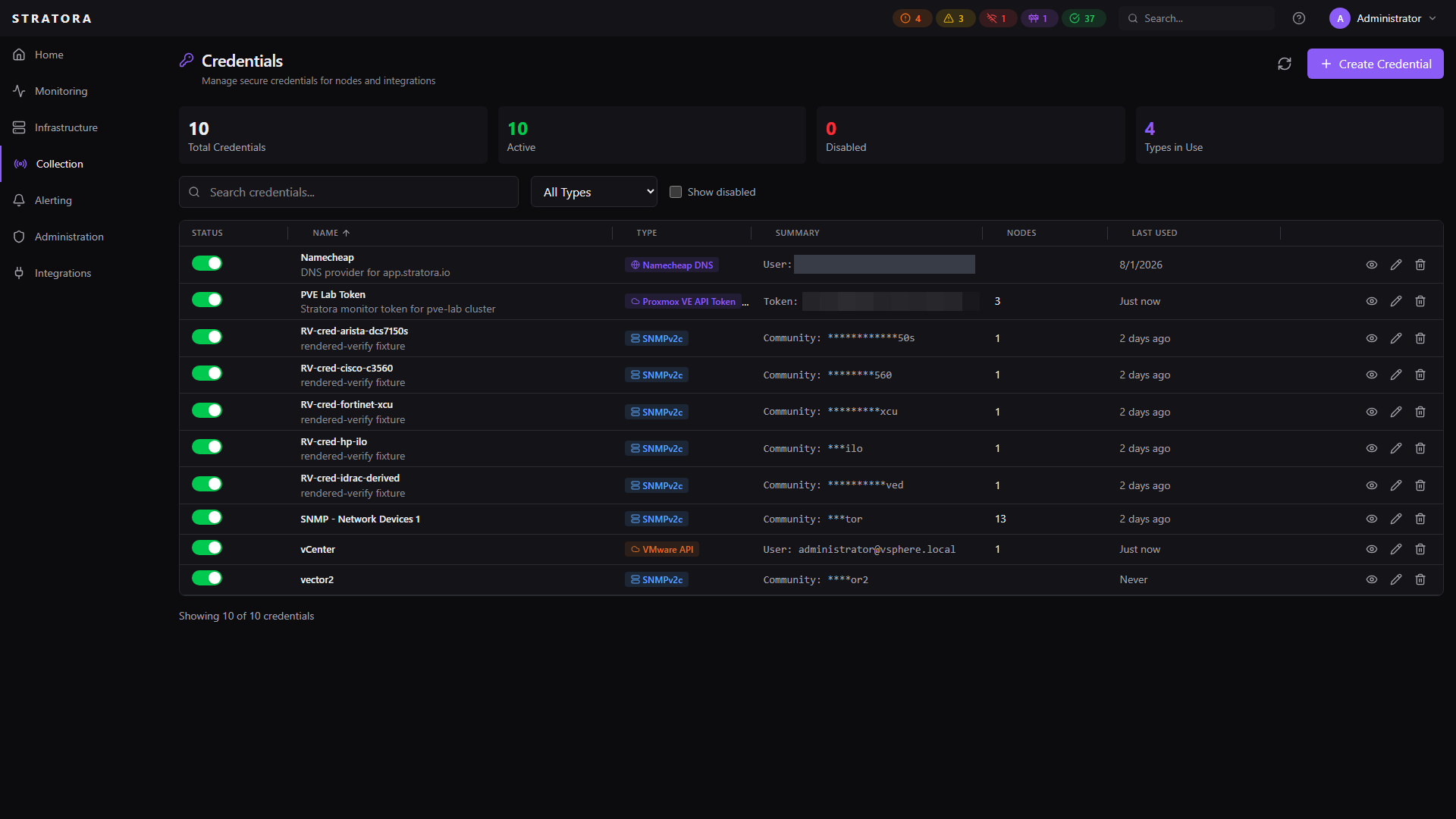
The credential vault stores the authentication secrets Stratora needs to monitor your infrastructure — SNMP communities, API passwords, SSH keys, and more. All secrets are encrypted at rest with AES-256-GCM and are never stored in plain text.
Credentials are managed centrally and attached to nodes as needed. This keeps secrets out of device templates and makes rotation straightforward — update a credential once and every node using it gets the new value automatically.
Looking for guidance on configuring SNMP on the device side — which version to enable, ACL rules, and what Stratora reads? See SNMP Devices.
Credential Types
| Type | Fields | Use Case |
|---|---|---|
| SNMPv2c | Community string | Network device polling (switches, firewalls, NAS, APs) |
| SNMPv3 | Username, security level, auth/privacy protocols and passwords, context name | Secure SNMP polling with authentication and encryption |
| VMware API | Username, password, SSL verification option | vCenter and ESXi monitoring via vSphere API |
| Proxmox VE API Token | Token ID (user@realm!name), token secret; use a cluster-wide token | Proxmox VE host and cluster monitoring via the PVE API |
| WMI | Username, password, domain | Windows device monitoring via WMI |
| SSH | Username, password or private key, passphrase | Linux device monitoring |
| S3 / MinIO | Access key, secret key, region, endpoint | S3-compatible storage monitoring |
| Azure Blob | Account name, account key or SAS token or service principal | Azure storage monitoring |
Creating and Managing Credentials
Navigate to Collection → Credentials and click Add Credential.
Each credential has:
| Field | Required | Description |
|---|---|---|
| Name | Yes | Unique display name (e.g., "Production SNMP v2c", "vCenter Admin") |
| Type | Yes | One of the types listed above |
| Description | No | Notes about the credential's purpose |
| Secret fields | Yes | The authentication data (varies by type) |
After creation, secret values are encrypted and can only be revealed by an Admin.
Disabling a Credential
You can disable a credential without deleting it. Disabled credentials are excluded from config generation — nodes using a disabled credential will lose that monitoring capability until the credential is re-enabled.
Attaching Credentials to Nodes
Credentials are linked to nodes with a purpose that describes how the credential is used:
| Purpose | Description |
|---|---|
| primary | Default credential for the node's monitoring protocol |
| snmp | SNMP polling |
| wmi | Windows WMI queries |
| ssh | Linux SSH access |
| api | API-based monitoring (VMware, HTTP) |
| backup | Fallback credential |
Each node can have one credential per purpose. When the server generates a collector's Telegraf config, it decrypts the relevant credentials and injects them into the config template for each target.
Deleting a credential that's attached to nodes will remove those monitoring capabilities. Detach or replace the credential on affected nodes first.
Encryption
At-Rest Encryption
Every credential's secret data is encrypted with AES-256-GCM before being stored in the database.
- Per-credential nonce — each credential gets a unique 12-byte random nonce, preventing identical secrets from producing identical ciphertext
- Authenticated encryption — GCM provides both confidentiality and integrity verification, so tampered ciphertext is detected and rejected
- Credential binding — the encryption binds ciphertext to the credential's ID and type, preventing an attacker from swapping encrypted data between credential records
Plain-text secrets are never written to disk or stored in the database.
Key Management
The encryption key is stored outside the database:
- Environment variable (recommended for containers):
STRATORA_CREDENTIAL_KEY_1 - Key file (recommended for traditional deployments): a file containing the 256-bit key
The key is a 64-character hex string representing 32 bytes (256 bits). Generate one with:
openssl rand -hex 32
Key Rotation
Stratora supports zero-downtime key rotation with multiple key versions active simultaneously.
Rotation Process
- Generate a new key:
openssl rand -hex 32 - Add the new key as version 2 alongside the existing version 1
- Restart the Stratora backend
- Re-encrypt all credentials with the new key via the admin API — this is an atomic per-credential operation that decrypts with the old key and re-encrypts with the new one
- Verify all credentials are on the new key version
- Retire the old key (keep a backup)
During rotation, both key versions are active. Credentials encrypted with either version can be decrypted. This means there's no service disruption during the re-encryption process.
Role-Based Access
| Action | Admin | Operator | Viewer |
|---|---|---|---|
| View credentials (masked) | Yes | Yes | Yes |
| Create / edit / delete | Yes | — | — |
| Reveal secret values | Yes | — | — |
| Disable / enable | Yes | — | — |
| Attach to nodes | Yes | Yes | — |
| Detach from nodes | Yes | Yes | — |
Operators can see which credentials exist and attach them to nodes, but cannot view the actual secret values or create new credentials. This separation lets network operators assign the right SNMP community to a switch without ever seeing the community string itself.
Viewers see credential names and types only — all secret fields are masked.
Audit Logging
All credential operations are recorded in the audit log:
| Event | What's Logged |
|---|---|
| Created | Who created it, credential name and type |
| Updated | Who updated it, which fields changed (not secret values) |
| Deleted | Who deleted it, credential name preserved for traceability |
| Revealed | Who revealed the secret and the stated reason |
| Attached | Who attached it, to which node, for which purpose |
| Detached | Who detached it, from which node |
| Disabled / Enabled | Who changed the state |
Audit entries include the user, timestamp, and action context. Secret values are never included in audit logs.