Data Retention
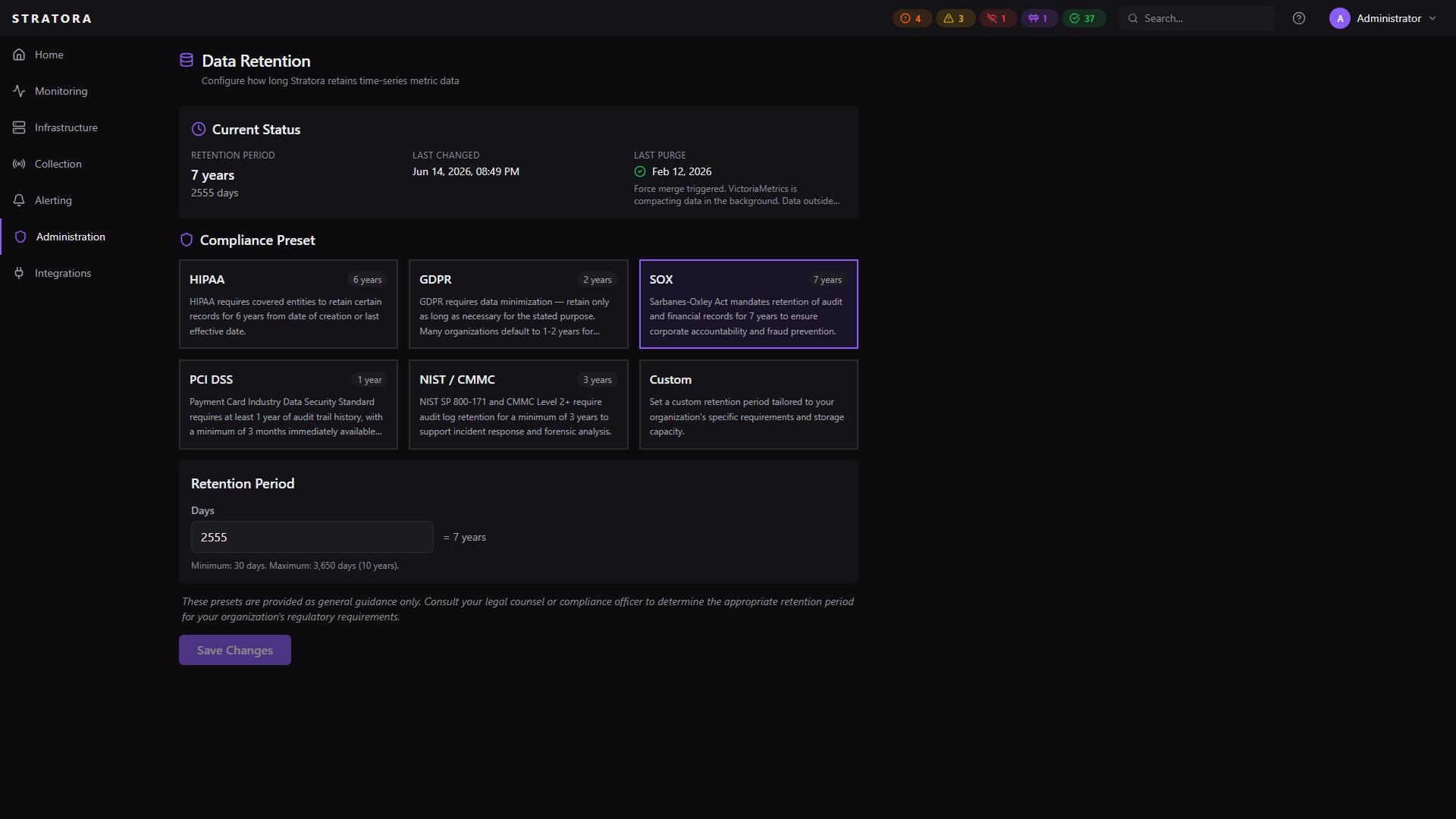
Stratora stores time-series metric data in VictoriaMetrics. The data retention settings control how long this data is kept — balancing storage costs, query performance, and compliance requirements.
How Retention Works
Data retention operates at the VictoriaMetrics storage layer using its native -retentionPeriod parameter. When you change the retention period:
- Immediate query inaccessibility — data older than the new retention period becomes non-queryable as soon as the change takes effect. Dashboards, reports, and API queries will no longer return data outside the retention window.
- Async disk cleanup — physical deletion from disk happens during VictoriaMetrics' background compaction cycles. This is eventual, not instantaneous.
- Optional forced compaction — you can trigger an immediate compaction to accelerate disk reclamation.
The query inaccessibility is deterministic and provable — once the new retention period is active, no query can access data outside it. This is important for compliance scenarios where you need to demonstrate that data is no longer accessible after a defined period.
Configuring Retention
Navigate to Administration → Data Retention to view and change the retention policy.
Compliance Presets
Select a preset that matches your regulatory requirements, or choose Custom to set a specific number of days.
| Preset | Retention Period | Typical Use Case |
|---|---|---|
| HIPAA | 6 years (2,190 days) | Healthcare environments subject to HIPAA |
| SOX | 7 years (2,555 days) | Financial/public companies subject to Sarbanes-Oxley |
| NIST / CMMC | 3 years (1,095 days) | Government contractors, defense supply chain |
| GDPR | 2 years (730 days) | EU data protection compliance |
| PCI DSS | 1 year (365 days) | Payment card processing environments |
| Custom | 30–3,650 days | Any custom period |
The minimum retention period is 30 days. The maximum is 3,650 days (10 years).
Changing the Retention Period
- Select a compliance preset or enter a custom number of days
- Click Save
- Stratora updates the VictoriaMetrics configuration and restarts the metrics service automatically
The change takes effect within seconds. No manual service restarts are required.
Force Compaction
When you reduce the retention period, you can optionally trigger an immediate compaction to reclaim disk space faster.
Without forced compaction, VictoriaMetrics will eventually clean up old data during its normal background compaction cycles. Forced compaction accelerates this process by requesting an immediate merge operation.
How It Works
- When saving a shorter retention period, check the Purge immediately option
- Stratora waits for VictoriaMetrics to become healthy after its restart
- A force-merge request is sent to VictoriaMetrics
- The compaction runs in the background — this may take some time depending on data volume
The compaction status is shown on the data retention page:
| Status | Meaning |
|---|---|
| Idle | No compaction in progress |
| Running | Compaction is actively processing |
| Completed | Last compaction finished successfully |
| Failed | Last compaction encountered an error |
Only one compaction can run at a time. If a compaction is already in progress, you'll need to wait for it to complete before triggering another.
Audit Trail
Every retention policy change is recorded in the audit log:
- Who changed the policy
- Previous retention period (days)
- New retention period (days)
- Compliance preset selected
- Whether VictoriaMetrics was restarted
If a forced compaction is triggered, a separate audit entry is created for the purge request.
Default Configuration
A fresh Stratora installation defaults to:
- Preset: Custom
- Retention period: 365 days (1 year)
These defaults apply until an administrator explicitly changes them.