Users
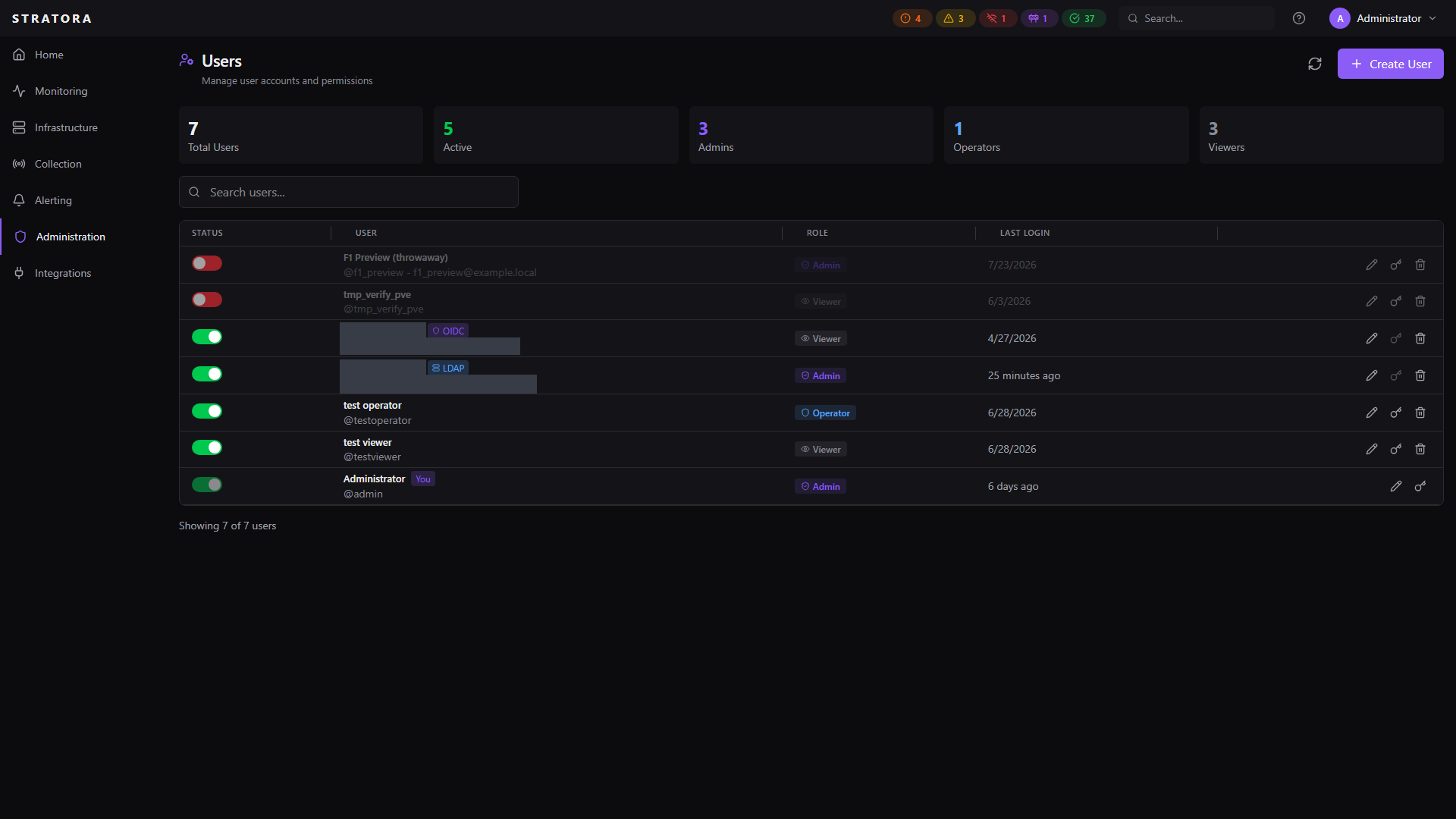
The Users page lets administrators manage who can access Stratora and what they can do. Users can be created locally or provisioned automatically from LDAP or OIDC identity providers.
Roles
Every user is assigned one of three roles. Roles determine what actions the user can perform across the platform. For the full permissions breakdown by feature area, see User Roles & Permissions.
Admin
Full access to everything in Stratora. Admins can manage users, configure identity providers, modify system settings, and perform all operational tasks.
Operator
Day-to-day operational access. Operators can create and manage nodes, deploy agents and collectors, run discovery scans, manage dashboards, alerts, and maintenance windows, but cannot access user management, system settings, or delete nodes.
Viewer
Read-only access. Viewers can see dashboards, nodes, alerts, and maps, but cannot make changes.
Permissions Breakdown
| Section | Area | Admin | Operator | Viewer |
|---|---|---|---|---|
| Monitoring | Dashboards | View, create, edit, delete, share | View, create, edit, delete, share | View only |
| Monitoring | Rack diagrams | View, create, edit, delete | View, create, edit, delete | View only |
| Monitoring | Reports | View, manage | View, manage | View only |
| Monitoring | Topology maps | View, create, edit, delete | View, create, edit, delete | View only |
| Infrastructure | IPAM | View, manage | View, manage | View only |
| Infrastructure | Node groups | View, manage | View, manage | View only |
| Infrastructure | Nodes | View, create, edit, delete | View, create, edit | View only |
| Infrastructure | Sites | View, manage | View, manage | View only |
| Collection | Agents | Deploy, download, generate tokens | Deploy, download | View only |
| Collection | Collectors | View, manage, deploy | View only | View only |
| Collection | Credentials | View, create, edit, delete, reveal | View (masked), attach/detach | View (masked) |
| Collection | Discovery | View, run, manage | View, run, manage | View only |
| Collection | Enrollment tokens | View, create, reveal, delete | View, select existing | — |
| Alerting | Alert configurations | View, edit | View, edit | View only |
| Alerting | Alerts | View, acknowledge, mute, test | View, acknowledge, mute | View only |
| Alerting | Contacts | View, manage | View, manage | View only |
| Alerting | Escalation teams | View, manage | View, manage | View only |
| Alerting | Maintenance | View, manage | View, manage | View only |
| Administration | License | View, manage | View only | View only |
| Administration | Settings | View, modify | View only | View only |
| Administration | Users | View, manage | — | — |
Credential access deserves special attention: Operators can see which credentials exist and attach them to nodes for monitoring, but they cannot view the actual secret values, create new credentials, or delete existing ones. Only Admins can reveal plaintext secrets. Viewers see credential names and types only — all secret fields are masked.
Managing Users
Creating a Local User
Navigate to Administration → Users and click Add User.
| Field | Required | Description |
|---|---|---|
| Username | Yes | Unique login name |
| No | Email address | |
| Display Name | No | Friendly name shown in the UI |
| Password | Yes | Minimum 8 characters |
| Role | Yes | Admin, Operator, or Viewer |
Editing a User
Click on a user to edit their profile. You can change:
- Email address
- Display name
- Role assignment
- Active status
Admins cannot change their own role or deactivate their own account. This prevents accidental lockout.
Resetting a Password
Admins can reset another user's password from the user detail view. When a password is reset:
- All of the user's existing sessions are immediately invalidated
- The user must log in with the new password
Password reset is only available for local accounts. Users who authenticate via LDAP or OIDC manage their passwords through their identity provider.
Force Password Change
Admins can require a user to change their password at next login by setting the Force password change flag on the user. When this flag is set, the user is locked out of every feature in Stratora until they change their password — only the change-password screen, the logout action, and the account-info endpoint remain accessible. Other API requests return 403 password_change_required until the user completes the change. The flag clears automatically once the new password is set.
The default admin account ships with this flag set so the initial password must be changed on first login.
Disabling a User
Deactivating a user prevents them from logging in without deleting their account. All active sessions are terminated immediately. The account can be reactivated later.
The built-in admin account cannot be deactivated — this ensures there is always at least one way to access the system.
Deleting a User
Permanent deletion removes the user from the database entirely. The user's actions in the audit log are preserved (the username is stored independently of the user record).
Provisioned Users
Users who authenticate via LDAP or OIDC are created automatically on their first login. These provisioned users appear in the user list with their authentication source indicated.
| Behavior | Local Users | LDAP Users | OIDC Users |
|---|---|---|---|
| Password managed by | Stratora | Active Directory | Identity provider |
| Password change in Stratora | Yes | No | No |
| Role assignment | Manual | From AD group mappings | From IdP group mappings |
| Role refresh | Manual | On every login | On every login |
| Profile sync (email, name) | Manual | On every login | On every login |
For provisioned users, role changes should be made in the identity provider (by adjusting group memberships), not in Stratora. The role is refreshed from the directory on every login, so manual role changes in Stratora would be overwritten.
Sessions
User sessions have the following characteristics:
- Duration: 24 hours from login
- Storage: Session tokens are SHA-256 hashed before storage — plaintext tokens are never persisted
- Cleanup: Expired sessions are automatically purged every hour
- Invalidation: All sessions are terminated when a password is reset or an account is deactivated
- Multi-device: Users can have active sessions on multiple devices simultaneously
Default Admin Account
Every Stratora installation includes a default admin account:
- Username:
admin - A password change is required on first login
- This account cannot be deactivated or deleted
- It provides emergency access if identity provider integrations become unavailable